Loading…


Article
In this post, I will discuss the benefits of utilising a Sandbox for CRM analytics projects, and I’ll also explain how to set it up for better testing. Testing CRM analytics in a sandbox environment is crucial for sev…
Rajitha Manthapuri
Contributor

In this post, I will discuss the benefits of utilising a Sandbox for CRM analytics projects, and I’ll also explain how to set it up for better testing.
Testing CRM analytics in a sandbox environment is crucial for several reasons. Understanding its significance can help emphasise the importance of proper preparation.
By setting up a sandbox environment specifically for testing CRM analytics, organisations can create a controlled and isolated space where developers, data analysts, and other stakeholders can experiment, validate, and refine analytics models without any risk to live customer data or business processes. This separation ensures that any issues or unexpected outcomes can be addressed and resolved before deploying changes to the production environment.
Additionally, testing in a sandbox environment allows for thorough validation of analytics algorithms, data pipelines, and integration with other systems or data sources. It provides an opportunity to simulate real-world scenarios and assess the performance and accuracy of analytics insights under different conditions. The initial step after choosing to develop in a Sandbox involves considering a full Sandbox copy, as it provides access to the most recent version of production data for working purposes.
The initial step after choosing to develop in a Sandbox involves considering a full Sandbox copy, as it provides access to the most recent version of production data for working purposes.
Here’s a step-by-step guide on how to set up a sandbox for effective testing:
Identify mandatory fields such as Account Name for Account Object and any related lookup relationships. Prepare test data accordingly, ensuring completeness and accuracy.
In Analytics Studio, navigate to Create > Dataset. Choose the CSV file containing your prepared test data, select the appropriate app, and give your dataset a descriptive name. Define each field type (Dimension, Date, or Measure) and proceed to upload the file.
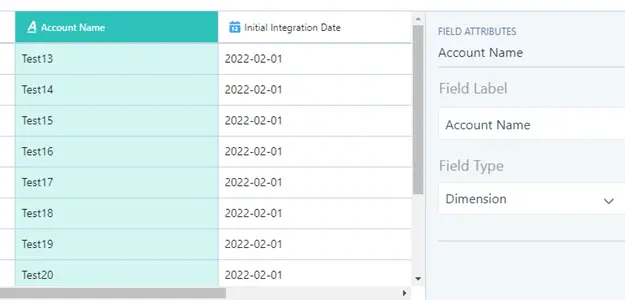
In Data Manager, under Recipes, create a new recipe. Add the input data by selecting the dataset created earlier. Define the output node with details like connection name, object name, and operation (Insert/Update/Upsert). Map all fields accordingly.
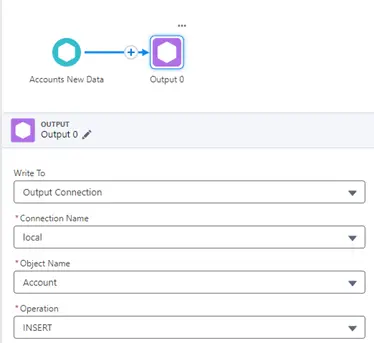
Once configured, save the recipe, and initiate the run. Monitor the progress in the Job Monitor queue. Upon successful completion, the data will be loaded into the Account object.
In a similar way, you can load data into any object like Case, Campaign, Contact, or custom objects.
With this setup, testers can effortlessly create test files, load them into the dataset, and run the recipe to validate their data. This streamlined process ensures efficient CRM analytics testing within the sandbox environment.
In general, it’s a good idea to write down every step that you take when developing. CRM Analytics has tools to help with this, like description fields and version history. Whether you’re working in production or sandbox, clear documentation makes it easier to manage and support CRM Analytics for your team.
By following these steps, your sandbox environment will be adequately prepared for comprehensive CRM analytics testing, facilitating accurate insights and informed decision-making.
Preparing Your Sandbox for CRM Analytics Testing was originally published in builure on Medium, where people are continuing the conversation by highlighting and responding to this story.
30-minute discovery call. No deck, no slides, just a real conversation about what you're trying to build and whether we can help.